
Here are a collection of suggestions for troubleshooting your Buying Buddy Plugin installation for sites using the JavaScript plugin (all apart from WordPress and Wix).
When Widgets and functions don't work as expected after your installation, this is often due to conflicts that prevent the plugin loading normally.
We recommend that you ensure that your website has no JavaScript errors before installing the Buying Buddy plugin.
General Troubleshooting Checklist
Make sure you are only loading the Buying Buddy plugin ONCE. You can check this by looking at the source code of your generated pages.
Map "Fullscreen View" Layering Issues
PROBLEM: Elements of your web design appear above the "fullscreen" view of the map.
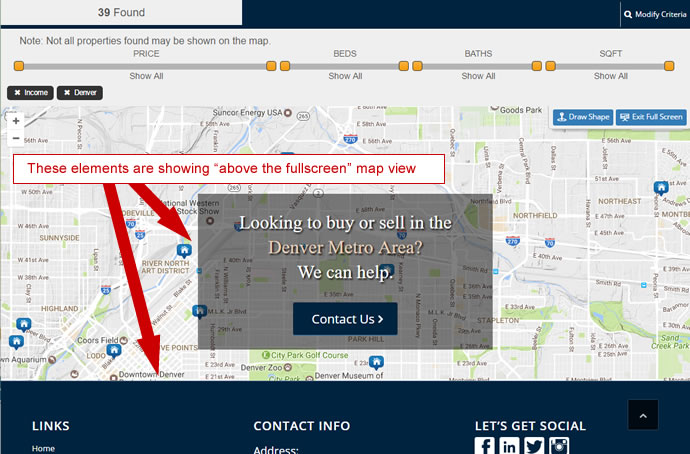
This issue is caused because the elements that are appearing above the map are positioned relative, which means that although our map uses a very high z-index (600000), this is only relative to the container that the map is in.
SOLUTION: You will need to specifically set the z-index of the offending DIV containers to be a lower number than it is currently.
For example, if you have a DIV container for the footer which is appearing above the map - then inspect the code to discover the z-index and change it to be a lower number until the problem is solved.
Buttons such as "search" or "save property" don't work
When you click the 'View results' button on a search form, nothing happens.
When you click the "Save Property" or "Save Search" button - nothing happens.
or
Results widget shows no properties
When you view the page you created for 'results' that has the 'results' widget on it, the widget is displayed but there are no properties.
REASON: All these scenarios are caused because the Buying Buddy plugin is not loading as required.
Browser Developer Tools
The Developer Tools feature of your browser provides a very useful way for debugging JavaScript that isn't working as expected.
See how to use this in Finding Errors with the Browser's Developer Tools
Solving JavaScript Issues
When buttons and functions are visible, but don't work when clicked, this indicates that something is preventing the the Buying Buddy JavaScript from loading in the right sequence.
If you are still stuck, then report the issues in a new help ticket. Please include details of any actions or remedies you have already tried.
How To View Webpage Source Code
Windows
- CTRL + u
Or use the menu.
Mac
- Option + Command + u
- Firefox: Command + u
Or use the menu.