
Automatically sync your HighLevel contacts with Buying Buddy and set up listing alerts through webhook integration. This guide will walk you through the complete setup process.
New to Buying Buddy on HighLevel? Bringing contacts into Buying Buddy is one step of the full setup. Start with Getting Started with Buying Buddy on HighLevel for the complete journey - installing search, embedding your dashboard, and syncing leads in both directions.
Before You Begin: You'll need the following found in your Buying Buddy account:
Get your API Key:
Get the mls_id:
Setup Steps
1
Configure the Webhook in HighLevel
Set up the HTTP request in your workflow
In your GoHighLevel workflow:
- Add a new action and select Webhook
- Set Method to
POST - Enter the URL:
https://www.leadsandcontacts.com/api-lead/add
2
Add Required Fields
Configure essential contact information
Add these fields to your webhook configuration:
| Field Name | GHL Value | Required |
|---|---|---|
api_key | Your API Key | ✓ Yes |
client_lead_id | {{contact.id}} | Recommended |
first_nm | {{contact.first_name}} | Recommended |
last_nm | {{contact.last_name}} | Recommended |
email | {{contact.email}} | Recommended |
phone | {{contact.phone}} | Optional |
site_url | Website Domain | Optional. Website domain (without www) for lead assignment in multi-domain accounts. |
Important: Use first_nm and last_nm (not "first_name" or "last_name" or other variants)
3
Enable Listing Alerts (Optional)
Automatically create property alerts for leads
To create listing alerts for your leads, add these fields:
| Field Name | Value | Notes |
|---|---|---|
listing_alert | 1 | Required to set up listing alerts. Set to "1" to enable |
listing_alert_frequency | daily | Options: instant, daily, weekly, monthly |
listing_alert_nm | Custom name | Optional (defaults to "First Saved Search") |
Critical: When enabling listing alerts (listing_alert = 1), you MUST include sf_mls_id in your search criteria!
4
Add Search Criteria Fields
Define property search parameters
Critical: ALL search fields MUST use the sf_ prefix! Example: Use sf_city not just city
Required MLS Field
Get "mls_id" from Authorized Websites shown your Buying Buddy account
sf_mls_id
Common Search Fields
Location
sf_citysf_statesf_countysf_zip_code
Price
sf_price_minsf_price_max
Property Type
sf_property_typesf_property_subtypesf_listing_status
Beds & Baths
sf_bedrooms_total_minsf_bedrooms_total_maxsf_baths_total_minsf_baths_total_max
Tip: For multiple values, separate with commas: sf_city = "Austin,Dallas,Houston"
Complete Configuration Example
Here's an example webhook configuration with all commonly used fields:
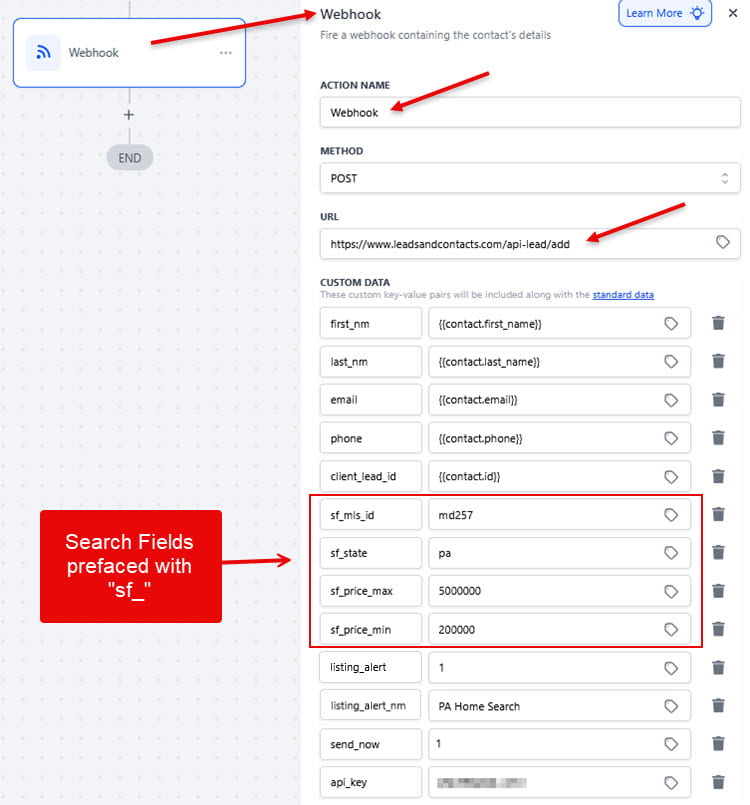
Add Buying Buddy lead_id to your Highlevel Contact
When the custom webhook is triggered, a response is sent back from the Buying Buddy API that includes the lead_id from the Buying Buddy system. It is recommended that you save this to the contact record in Highlevel.
The flow is:
- Custom Webhook action (POST to Buying Buddy) → enable "Save response from this Webhook".
- Update Contact action → map the captured
lead_idreference into a custom field (e.g. "Buying Buddy Lead ID").
Setup detail
- Create the custom field first. Add a contact custom field (text or number) for the Buying Buddy lead ID before you configure the Update Contact step, so it's available to map to.
- In the Custom Webhook action check the option called "Save response from this Webhook," which captures the JSON response from the Buying Buddy API.
- Test in draft mode to seed the response. To make the reference resolve to
lead_id, the webhook needs to have actually run once and returned a sample so HighLevel knows the response shape. So, use Test Workflow (draft mode) with a sample record to trigger the action - this generates a real response so thelead_idkey appears in the reference picker. Without a captured sample, you won't see the key to map. - Add Update Contact action that writes
lead_idinto a custom field on the contact.
Watch the response type. Your example returns "lead_id": 12345 as a number and "success": "true" as a string. That's fine for mapping, but if you ever branch on success, treat it as a string.
Example of the Add Lead API Response
{
    "success": "true",
    "code": "new",
    "msg": "Lead Imported Successfully",
    "lead_id": 12345
}
Testing Your Integration
Verify Your Setup
Follow these steps to test your webhook
- Save your workflow in GoHighLevel
- Run a test with a sample contact
- Check Buying Buddy to verify the lead was added
- If you enabled listing alerts, check the lead details has the alert setup.
Success! If the lead appears in Buying Buddy, your integration is working correctly.
Problems? See the API Log to review what was received.
Troubleshooting Common Issues
Lead Not Appearing in Buying Buddy
- Verify your API key is correct and active
- Check the webhook URL is exactly:
https://www.leadsandcontacts.com/api-lead/add - Ensure the method is set to POST
- Check GoHighLevel workflow logs for error messages
Listing Alert Not Created
- Ensure
listing_alertis set to "1" - Verify
sf_mls_idis included and correct - Check that at least one search criteria field is populated
- Confirm the MLS ID matches one in your Authorized Websites
Search Fields Not Working
- Remember ALL search fields must use the
sf_prefix - Double-check field names (e.g.,
first_nmnot "first_name") - Verify values match your MLS options exactly
- Test with basic fields first (city, price range)
Additional Resources
- Widget Wizard: Discover all available search fields using the Wizard
- API Documentation: Access full API reference in
- Support: Submit a ticket through in your Buying Buddy account