
The Listings tab shows every property a lead has looked at on your website, as easy-to-scan cards with the photo, price, address, how many times they viewed it, and whether they saved it, rated it or left a note about it.
Why it matters: The homes a buyer keeps coming back to are their shortlist, even if they have never told you. The Listings tab puts that shortlist in front of you, so you can suggest showings, send similar homes and talk about the properties they actually care about.
Where to Find It
Go to and click a lead's name to open their Lead Dashboard, then click the Listings tab. The tab shows two numbers: ❤ saved properties / properties viewed in the last 90 days.
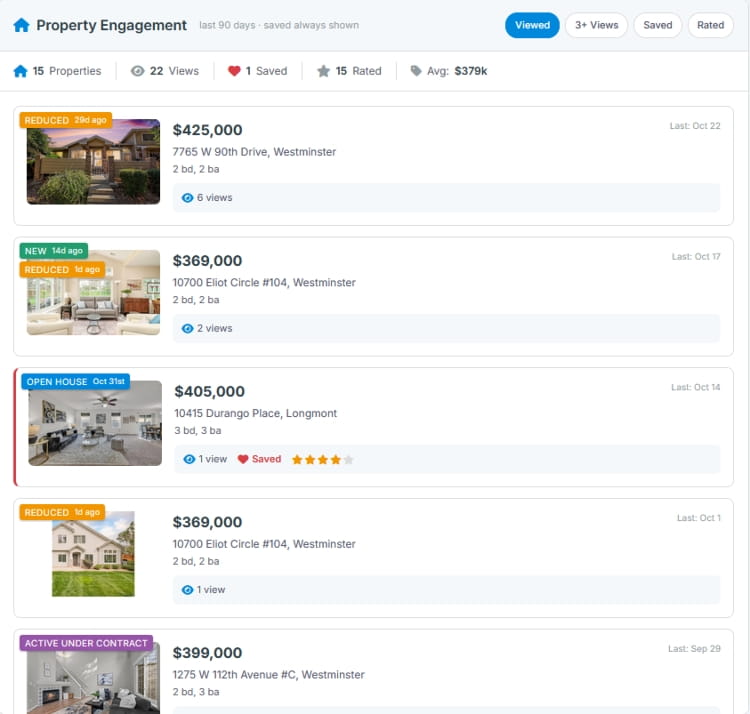
How the Tab Is Laid Out
1
Filter Chips
Find the homes that matter most
| Chip | Shows |
|---|---|
| Viewed | Every property viewed in the last 90 days, plus all saved properties (the default) |
| 3+ Views | Properties the lead has viewed three or more times. These are strong signals of interest |
| Saved | Every property the lead has saved as a favorite, however long ago |
| Rated | Properties the lead has given a star rating |
2
Stats Bar
Their property search in five numbers
| Stat | What it counts |
|---|---|
| Properties | Different properties viewed in the last 90 days |
| Views | Total property views in the last 90 days, including repeat views |
| Saved | All properties the lead has saved |
| Rated | Properties the lead has rated in the last 90 days |
| Avg | The average price of the properties viewed in the last 90 days |
3
Listing Cards
Everything about the lead's interest in each home
Cards are listed with the most recently viewed first, 20 per page. Each card shows:
- The listing photo, price, address and beds, baths and square footage.
- Last: when the lead last viewed it, for example Last: 2h ago.
- How many times they viewed it, such as 4 views, and a Saved marker if they saved it.
- The lead's own star rating, if they rated the home on your website.
- Lead Note: any note the lead wrote about the home, such as "Love the backyard, kitchen needs work".
A Rent / Lease label marks rental listings, and a status banner appears on the photo when a listing's status has changed. Listings no longer on the market show Off Market in place of the photo.
Click a card to open the full property details in a side panel.
Looking further back? The tab starts with the last 90 days. Click Show all viewed listings up to 12 months at the bottom of the list to see a full year. Saved listings are always shown, whatever the time frame.
Put It to Work

Example: Turn Repeat Views into a Showing
The 3+ Views chip is your best showing prompt
Click 3+ Views. A home in Littleton shows 6 views, last viewed this morning, and the lead has rated it 4 stars. Call and offer to show it this week:
"I noticed the home on Elm Street keeps catching your eye. Would you like to see it in person? I have time Thursday or Saturday."
Example: Learn What They Love (and What They Don't)
Ratings and notes are free feedback
Click Rated and compare the homes they gave 5 stars with the ones they gave 1 or 2. Read their Lead Notes. If every top-rated home has a big yard and every low-rated one is on a busy road, you now know exactly what to look for, and what to leave out of their next listing alert.
Frequently Asked Questions
Whose star rating is shown on the cards?
The lead's. Leads can rate homes and add notes while browsing your website. This is different from the star rating in the Lead Dashboard header, which is your own rating of the lead.
How is this different from Property Engagement?
Property Engagement in the sidebar sums up the pattern: price range, locations and typical home. The Listings tab shows the individual homes behind that pattern. Use them together.
Why does the tab say "No listings viewed"?
The lead has not viewed any properties on your website while signed in during the time frame shown. Try Show all viewed listings up to 12 months, or set up a listing alert to bring them back to your website.