
Suggested Actions is your built-in follow-up coach. Each time you open a lead, Buying Buddy checks their recent activity and your contact history, then recommends the next best step, with a button to do it right away.
Why it matters: Most deals are lost to slow or forgotten follow-up, not to competitors. Suggested Actions spots the gaps for you, such as a lead who is browsing right now, a lead nobody has called, an email address that is not getting through, or a lead with no listing alert, so you can fix them in one click and keep every lead moving forward.
Where to Find It
Go to and click a lead's name to open their Lead Dashboard. Suggested Actions is the first panel at the top of the right-hand sidebar.
Suggestions are listed with the most urgent first. Each one shows a title, a short explanation, and an action button, and most have a small X in the corner to dismiss them. When there is nothing to do, the panel shows All caught up! No suggested actions.
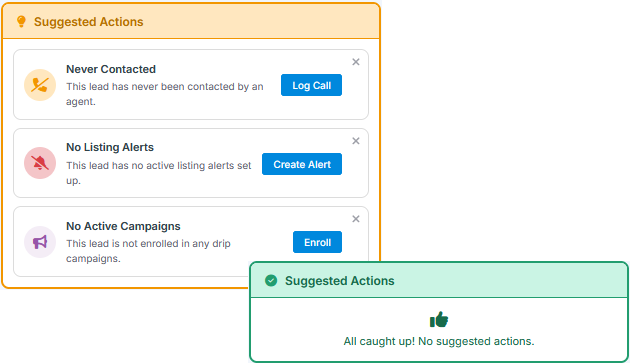
The Suggestions
Suggestions are worked out fresh every time you open the lead, using real activity data. Here is each one, when it appears, and what the button does.
| Suggestion | When it appears | Button |
|---|---|---|
| 🔥 High Engagement Today | In the last 24 hours the lead viewed 5 or more properties, saved a property, submitted a form, or replied to an email or text. The detail line tells you which, for example "6 property views, 1 saved in the last 24 hours" | Call Now - opens the call log so you can call and record the outcome |
| ⚠️ Email Is Invalid | The lead's email address has been marked invalid, for example because messages to it bounced. Listing alerts, campaigns and market reports cannot reach the lead until it is fixed | Fix Email - opens a form where you can correct the email address |
| Never Contacted | No completed call or email to this lead has been logged yet | Log Call |
| No Contact in [N] Days | It has been 7 days or more since your last completed call or email. The detail line shows the date of the last contact | Log Call |
| Pre-Approved, No Deal Stage | The lead has Buyer interest and a mortgage status of Pre-Approved, but no buyer deal stage has been set | Set Stage - opens the buyer pipeline so you can choose where this buyer is in your process |
| Seller Has No Property Address | The lead has Seller interest but no property address on file | Add Address - opens the lead's profile at the address section so you can add the home they want to sell |
| No Listing Alerts | The lead has no active listing alert (not shown if the lead has opted out of alerts) | Create Alert - opens the new listing alert form |
| Listing Alert Expiring | One of the lead's listing alerts ends within the next 14 days | Manage Alerts - opens the lead's alerts so you can extend the end date |
| Alert Engagement Low | The lead received at least 3 alert emails in the last 30 days, but both the open rate and the click rate are under 25%. The detail line shows the actual rates | Edit Alerts - opens the lead's alerts so you can adjust the criteria |
| No Active Campaigns | The lead is not enrolled in any drip campaign (not shown if the lead has opted out of campaigns) | Enroll - opens the lead's campaigns so you can add one |
| No Market Report | The lead has Seller interest and is not receiving a market report. Shown only when market reports are available for your account, and not shown if the lead has opted out of all emails | Set Up - opens the lead's market reports |
Tip: High Engagement Today always appears at the top. Act on it first: a lead who is actively browsing or has just reached out is the most likely to pick up the phone.
Clearing and Dismissing Suggestions
You do not need to tick anything off. A suggestion disappears on its own the next time the Lead Dashboard loads once the situation behind it is resolved. For example:
- No Listing Alerts clears as soon as the lead has an active alert.
- Never Contacted and No Contact in [N] Days clear when you log a completed call or send an email. A call attempt with no answer does not count as contact, so the suggestion stays until you reach them.
- No Active Campaigns clears when you enroll the lead in a campaign.
- Email Is Invalid clears when you update the lead to a working email address.
- Pre-Approved, No Deal Stage clears when you set a buyer deal stage, and Seller Has No Property Address clears when you add the address.
- Listing Alert Expiring clears when you extend the alert's end date beyond the next 14 days.
- High Engagement Today clears once the 24-hour burst of activity has passed.
If you have decided to skip a suggestion, click the X on it to hide it for 7 days. It is hidden for everyone on your account for that lead. If the situation is still the same after 7 days, the suggestion comes back. High Engagement Today cannot be dismissed because it clears on its own after 24 hours.
Put It to Work

Example: Get Every New Lead to "All Caught Up"
A simple routine for new leads
A new lead usually starts with three suggestions: Never Contacted, No Listing Alerts and No Active Campaigns. Work through them in a few minutes:
- Click Log Call, call the lead, and record the outcome.
- Click Create Alert and set up an alert based on what they told you, or on their Property Engagement if they have been browsing.
- Click Enroll and add them to a nurture campaign.
Reload the page and you should see All caught up! The lead now hears from you automatically, and you will be prompted again if a week passes without contact.
Example: Fix an Alert Nobody Opens
Low engagement usually means the criteria are off
You see Alert Engagement Low - Open rate: 10%, Click rate: 0%. Before you edit the alert, look at Property Engagement. If the lead is now browsing a higher price range or a different city than the alert covers, click Edit Alerts and update the criteria to match. Better still, call and ask what has changed. It is a natural reason to get in touch.
Frequently Asked Questions
Can I hide a suggestion I don't need?
Yes. Click the X on a suggestion to hide it for 7 days. It is hidden for everyone on your account for that lead, and comes back after 7 days if it still applies. High Engagement Today cannot be dismissed because it clears on its own after 24 hours. If a lead should never receive alerts or campaigns, record their opt-out instead and the related suggestion will stop appearing for good.
I logged a call but "No Contact" is still showing. Why?
Only completed contact counts. If you logged the call as an attempt where you did not reach the lead, the suggestion stays so you remember to try again.
Where else can I find leads that need attention?
Suggested Actions works one lead at a time. To find leads that need attention across your whole database, use the Hot Leads list and Lead Health counts on your Dashboard Home, or the Work Lists on Lead Summary.